
Sometimes part of your system already lives somewhere else. Sometimes you’re migrating. Sometimes you just don’t want to lock yourself into one provider.
So now you have two clouds. And they need to talk to each other.
Not over the public internet. Not with exposed services. But privately, securely, and in a way that doesn’t break every time one tunnel drops.
That’s what this setup solves.
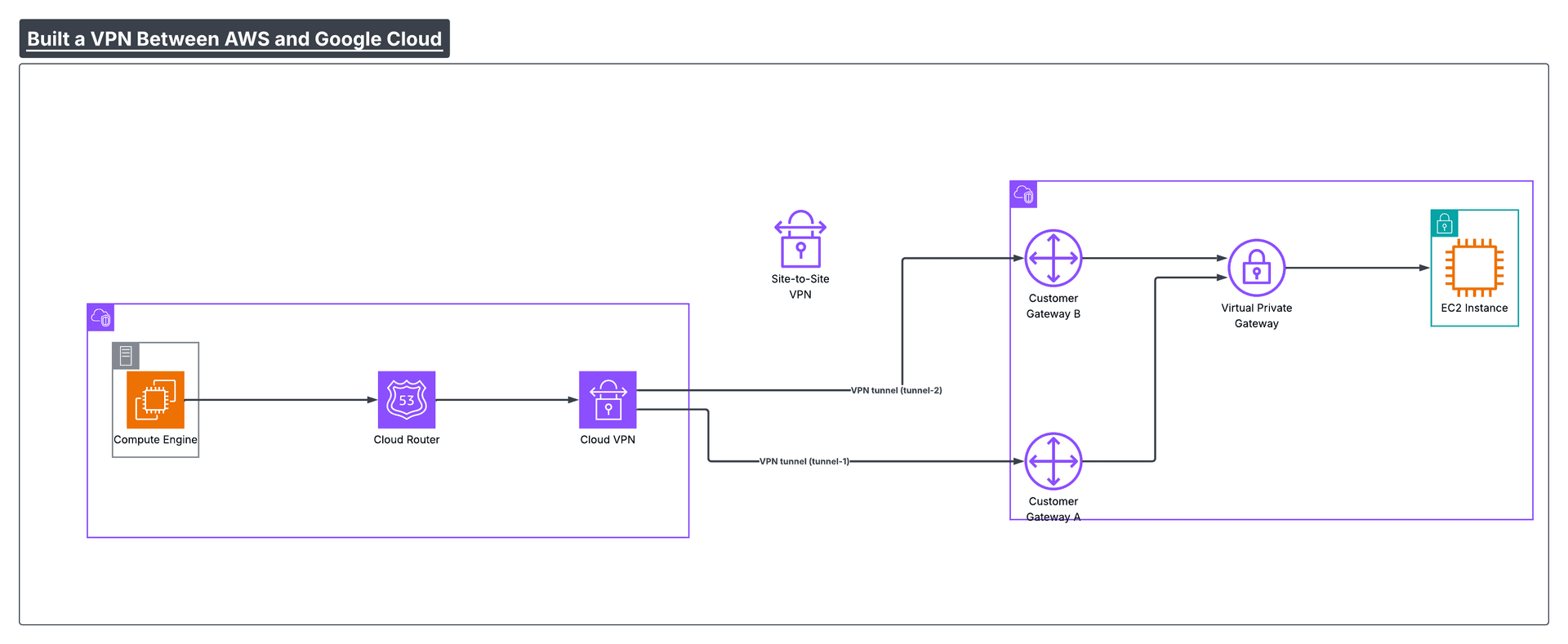
The high-level architecture
Both providers give you redundancy by default.
AWS gives you a VPN Gateway with two tunnels. Google Cloud gives you an HA VPN Gateway with two interfaces.
You connect them together using four tunnels in total.
On top of that, you run BGP. This handles routing automatically. When you add a subnet on one side, the other side learns about it without manual changes.
If one tunnel fails, traffic automatically moves to another one. You don’t need to touch anything.
That’s the “highly available” part.
This setup gives you 99.95% availability compared to 99.9% for a single tunnel. That's the difference between 4.3 hours and 26 minutes of downtime per year.
The single most important rule: your CIDR ranges must not overlap between clouds.
Google Cloud side
Step 1: Create the HA VPN Gateway
This is the public entry point on the GCP side. AWS will connect to this.
resource "google_compute_ha_vpn_gateway" "main" {
  name    = "gcp-vpn-gateway"
  network = google_compute_network.vpc.id
  region  = var.gcp_region
}
After applying this, Google Cloud gives you two public IP addresses. Save them.
Step 2: Create the Cloud Router
This is where BGP runs. It handles dynamic routing.
resource "google_compute_router" "main" {
  name    = "gcp-router"
  network = google_compute_network.vpc.id
  region  = var.gcp_region

  bgp {
    asn = 64515
  }
}
The ASN is just an ID. Any private number between 64512 and 65534 works.
At this point, GCP is ready to accept VPN connections.
AWS side
On AWS need to tell it about Google Cloud.
You create:
- a VPN Gateway attached to your VPC
- two Customer Gateways (one for each GCP IP)
- two VPN Connections
Step 1: Create the VPN Gateway
This attaches to your AWS VPC and represents AWS in the connection.
resource "aws_vpn_gateway" "main" {
  vpc_id = aws_vpc.main.id

  tags = {
    Name = "aws-vpn-gateway"
  }
}
Step 2: Create Customer Gateways
These represent Google Cloud from AWS’s point of view.
resource "aws_customer_gateway" "gcp_interface_0" {
  bgp_asn    = 64515  # Match GCP
  ip_address = google_compute_ha_vpn_gateway.main.vpn_interfaces[0].ip_address
  type       = "ipsec.1"
}

resource "aws_customer_gateway" "gcp_interface_1" {
  bgp_asn    = 64515
  ip_address = google_compute_ha_vpn_gateway.main.vpn_interfaces[1].ip_address
  type       = "ipsec.1"
}
Step 3: Create VPN Connections
This is what actually creates the tunnels.
resource "aws_vpn_connection" "to_gcp_0" {
  vpn_gateway_id      = aws_vpn_gateway.main.id
  customer_gateway_id = aws_customer_gateway.gcp_interface_0.id
  type                = "ipsec.1"
  static_routes_only  = false  # BGP handles routing
}

resource "aws_vpn_connection" "to_gcp_1" {
  vpn_gateway_id      = aws_vpn_gateway.main.id
  customer_gateway_id = aws_customer_gateway.gcp_interface_1.id
  type                = "ipsec.1"
  static_routes_only  = false
}
Each connection creates two tunnels. That's four tunnels total now.
AWS generates shared secrets and tunnel IPs automatically. Terraform will pull those and use them on the GCP side.
The static_routes_only = false is what enables BGP. With this, routes propagate automatically. Without it, you'd manually configure routes every time you add a subnet.
Back to GCP for tunnels
Now create the actual VPN tunnels on the GCP side using AWS's info.
resource "google_compute_vpn_tunnel" "tunnel_0_to_aws_0" {
  name                  = "tunnel-0-to-aws-0"
  region                = var.gcp_region
  vpn_gateway           = google_compute_ha_vpn_gateway.main.id
  vpn_gateway_interface = 0
  peer_gw_ip            = aws_vpn_connection.to_gcp_0.tunnel1_address
  shared_secret         = aws_vpn_connection.to_gcp_0.tunnel1_preshared_key
  router                = google_compute_router.main.id
  ike_version           = 2
}

# Repeat for the other 3 tunnels...
You create four of these total, one for each AWS tunnel endpoint.
Set up BGP peering
The tunnels are just pipes. BGP is what makes routing automatic.
resource "google_compute_router_interface" "interface_0" {
  name       = "bgp-interface-0"
  router     = google_compute_router.main.name
  region     = var.gcp_region
  ip_range   = "${aws_vpn_connection.to_gcp_0.tunnel1_cgw_inside_address}/30"
  vpn_tunnel = google_compute_vpn_tunnel.tunnel_0_to_aws_0.name
}

resource "google_compute_router_peer" "peer_0" {
  name            = "bgp-peer-0"
  router          = google_compute_router.main.name
  region          = var.gcp_region
  peer_ip_address = aws_vpn_connection.to_gcp_0.tunnel1_vgw_inside_address
  peer_asn        = aws_vpn_connection.to_gcp_0.tunnel1_bgp_asn
  interface       = google_compute_router_interface.interface_0.name
}

# Repeat for the other 3 peers...
The tunnel inside IPs (like 169.254.1.1/30) are assigned by AWS automatically. You don't pick them. Terraform pulls them and configures GCP to match.
Enable route propagation on AWS
resource "aws_vpn_gateway_route_propagation" "main" {
  vpn_gateway_id = aws_vpn_gateway.main.id
  route_table_id = aws_route_table.private.id
}
This tells AWS to automatically add routes learned via BGP to your route table.
After you apply, tunnels take 5 to 10 minutes to establish. They'll show as "down" initially. That's normal. BGP sessions need time to negotiate.
Test it
Spin up a VM in each cloud with private IPs only. No public IPs.
From AWS, ping the GCP VM's private IP. From GCP, ping the AWS VM's private IP.
If both work, the VPN is up and routing correctly.
Common problems
| Problem | Fix |
|---|---|
| Tunnels stay down after 10 minutes | Check that ASN numbers match on both sides. GCP router should use the same ASN as AWS customer gateways. |
| Ping works but apps don't connect | Check security groups (AWS) and firewall rules (GCP). ICMP is allowed but your app ports might be blocked. |
| Only some subnets reachable | Verify route propagation is enabled. Check BGP session status in both clouds. |
You built a production ready, highly available VPN between AWS and Google Cloud. Four tunnels, automatic failover, encrypted traffic, no internet exposure. The code is version controlled and repeatable. If you need to rebuild it, run terraform apply and wait 10 minutes.